
Android 16 Migration and Android 17 Early Verification
Bottom line: if you submit an update with a targetSdkVersion lower than what Google Play requires, it gets rejected at upload time. That means you can’t push updates to the store at all. This isn’t about new features — it’s a mandatory requirement to keep delivering updates to existing users and maintain your store listing.
Google Play has been raising the minimum targetSdkVersion by one level every August 31. Currently (August 2025 onward), all updates below API 35 (Android 15) are rejected.
| Enforcement Period | Requirement | If Not Met |
|---|---|---|
| August 2023 onward | API 33 (Android 13) or higher required | Upload rejected |
| August 2024 onward | API 34 (Android 14) or higher required | Upload rejected |
| August 2025 onward | API 35 (Android 15) or higher required | Upload rejected |
| Around August 2026 (projected) | API 36 (Android 16) or higher required | Upload rejected |
(Source: Google Play target API level requirements)
Based on this pattern, enforcement of API 36 (Android 16) is most likely around August 2026. To complete compliance before enforcement kicks in, this article scopes the work by working backward from an internal deadline of June 2026. Android 17 has reached platform stability at Beta 3, so running early verification in a parallel lane now means you won’t be scrambling when the final release drops.
Priority Order
| Item | Deadline | Priority | What to Do Now |
|---|---|---|---|
| targetSdkVersion 36 (Android 16) compliance | By June 2026 | Top priority | Regression test key user flows, lock CI, finalize release plan |
| Android 17 Beta 3 verification | Start now (ahead of schedule) | High (separate lane) | Compatibility testing on emulator and real devices, behavior changes audit |
| Android 17 new feature adoption | After official release | Lower | PoC starting with low-impact areas |
Get Your Tooling in Order First
Whether you’re working on Android 16 compliance or early Android 17 verification, the first blockers are usually build tooling issues rather than OS APIs. Lock down the tooling first.
| Component | Baseline | Reason |
|---|---|---|
| Android Studio | Panda 3 stable | Stable foundation for targetSdkVersion 36 work |
| AGP | 9.1.0 | Easier to absorb R8 behavior differences and lint changes |
| JDK | 17 | Prerequisite for AGP 9.1 |
| Kotlin | 2.3.20 | Align on a stable version baseline |
plugins {
    id("com.android.application") version "9.1.0" apply false
    id("org.jetbrains.kotlin.android") version "2.3.20" apply false
}
Locking JDK 17 in CI, updating AGP, and absorbing R8 differences serves double duty — it lays the groundwork for Android 17 while getting Android 16 compliance through the door.
Note: Real-World Kotlin Version Distribution and Migration Cost
The “Kotlin 2.3.20” in the table above is the recommended baseline. In practice, many projects are still on the 1.9.x line. Finance, government, and large-scale projects in Japan tend to be particularly conservative — the “it’s stable, so don’t upgrade” mindset persists for a long time.
The chart below is an estimate as of early 2026 based on JetBrains’ public ecosystem data and community observations.
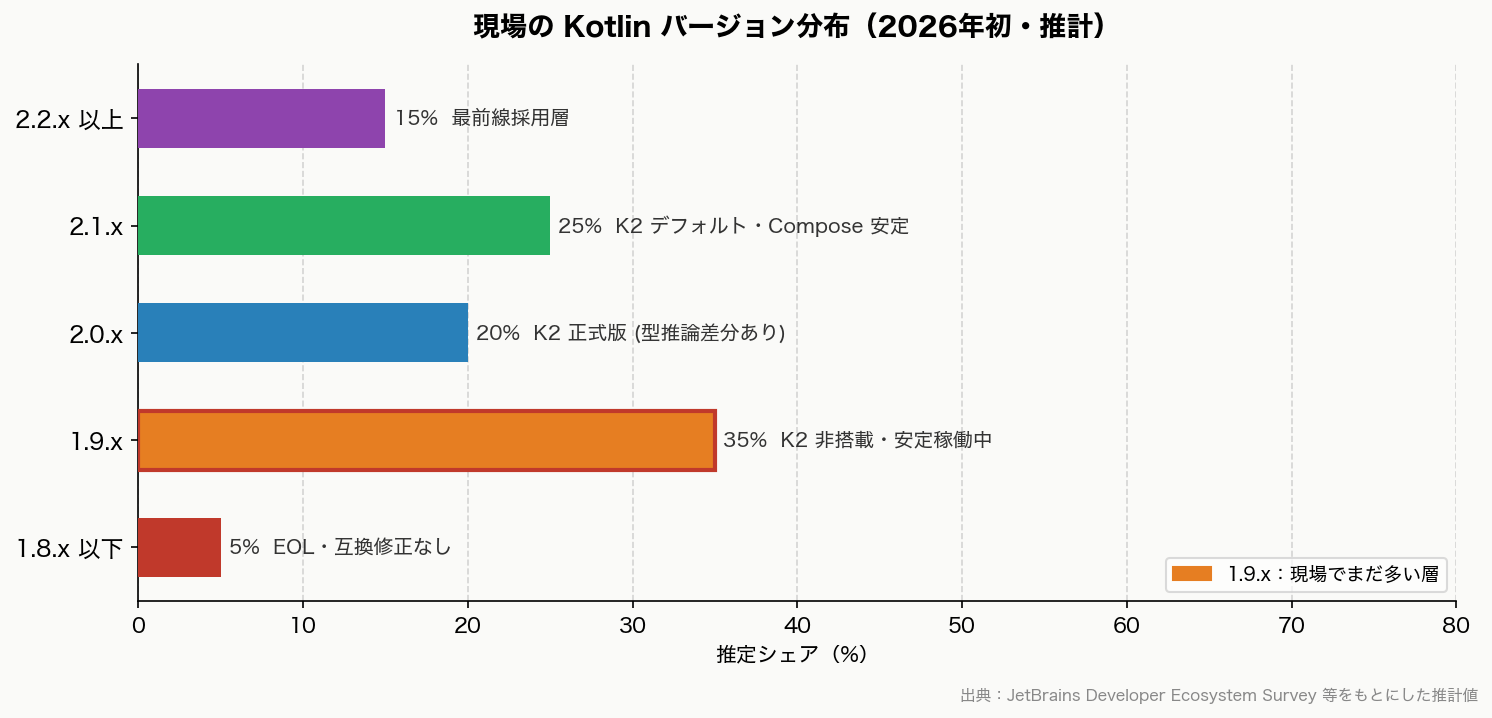
(Estimated values. For exact version-level share data, refer to the latest JetBrains Developer Ecosystem Survey)
When upgrading from 1.9.x to 2.x, it’s rarely just a Kotlin-only update — it usually means a bulk upgrade of Compose, Coroutines, and AGP together. Switching to the K2 compiler can change some type inference behavior, causing build errors. “We don’t need to upgrade our working 1.9.x app right now” is a perfectly pragmatic decision.
| Current Kotlin | Compose Compiler Approach | Minimum AGP | Key Considerations When Upgrading |
|---|---|---|---|
| 1.9.x | Legacy compose_compiler_extension_version |
8.x | Can stay as-is, but nearing EOL |
| 2.0.x | Compose Compiler Plugin (integrated into Kotlin plugin) | 8.4 or higher | Must switch to the plugin approach |
| 2.1.x | Same as above | 8.7 or higher | K2 enabled by default. Best Compose stability |
| 2.3.x | Same as above | 9.0 or higher | Cutting edge as of 2026. Requires AGP 9.1 |
Android 17 Behavior Changes to Get Ahead Of
Behavior changes have a bigger impact on existing apps than new features. Focus on changes that affect all apps first.
| Change | Apps Most Likely Affected | What to Check First |
|---|---|---|
usesCleartextTraffic deprecation trajectory |
All apps that currently allow HTTP | Switch test and internal connections to network security config |
| Removal of implicit URI permission grants | Apps with sharing, camera, or file attachment flows | Rewrite to use explicit permission grants |
| IME visibility behavior change after rotation | Every screen with input forms | Regression test login, sign-up, and search flows |
| Stricter background audio restrictions | Playback, calling, and audio notification apps | Assess whether foreground service migration is needed |
Testing Priority for Simultaneous Android 16 & 17 Support
When running Android 16 compliance and Android 17 early verification in parallel, it’s easy to lose track of what must be tested where. The table below defines required/priority items per test area — use it as a QA checkpoint to confirm when each area can be considered done.
| Test Area | Android 16 (Production) | Android 17 (Early Verification) |
|---|---|---|
| Login / membership flows | Required | Required |
| WebView screens | Required | Required |
| Push / notification resume | Required | High priority |
| Background processing | Required | High priority |
| MDM / enterprise device restrictions | High priority | High priority |
| Android 16/17 new feature adoption (predictive text, new Compose APIs, etc.) | Can defer | If capacity allows |
Risks Specific to Japanese Business Apps
These points are rarely covered in general Android migration articles from international sources, but finance, government, and membership-platform apps in Japan have their own specific gotchas. For projects where the priority is verifying that existing key flows — login, payments, notifications — aren’t broken rather than adopting new Android 16/17 features (notification channel changes, permission model overhauls, new Compose components, etc.), run through the items below as a checklist first.
| Issue | Why It’s a Blocker | What to Check First |
|---|---|---|
| WebView | Still heavily used in membership, sign-up, and payment flows | Authentication, cookies, redirects, rendering issues |
| Certificates / corporate Wi-Fi | Commonly breaks on corporate and managed devices | Connection failures, certificate renewal, internal network behavior |
| MDM restrictions | Major impact on enterprise-distributed apps | Permissions, background processing, distribution controls |
| Push / background processing | Directly affects membership, finance, and operational notifications | Resume behavior, delays, post-restriction behavior verification |
| Device refresh timing | Wide OS version variance across the user base | Review supported OS range and QA device plan |
Recommended Action Order
- Finalize the release plan with the assumption that the targetSdkVersion 36 (Android 16) update ships by June 2026
- Align your tooling: Android Studio, AGP, Kotlin, JDK
- Run key user flow tests and regression for Android 16 first
- In parallel, create a dedicated Android 17 branch and spin up a verification lane with emulators and real devices
- Work through behavior changes in order: security, media, connectivity
- Run a separate CI pipeline with targetSdk 37