Diary

How to Enable Vertical Tabs in Chrome

2 Mins read

Introduction

Google Chrome has an experimental Vertical Tabs feature that displays tabs in a left sidebar instead of the top bar. Microsoft Edge has offered this as a standard feature for some time, and Chrome now allows you to enable it via chrome://flags.

For anyone who keeps many tabs open or uses a widescreen monitor, vertical tabs can significantly improve productivity. This article explains how to enable and use them.

What Are Vertical Tabs?

In standard Chrome, tabs are arranged horizontally at the top of the window. As you open more tabs, each one gets narrower and the title becomes unreadable. With 20 or more tabs open, you can barely see anything beyond the favicon.

Enabling vertical tabs solves this problem:

  • Tabs are arranged vertically in a left sidebar, so titles remain visible even with many tabs open
  • Tab titles are always displayed as text, making it easy to find the tab you need
  • The top tab bar is removed, increasing vertical screen space for content
  • The sidebar can be collapsed and expanded as needed

Requirements

  • Supported OS: Mac, Windows, Linux, ChromeOS
  • Chrome version: Latest version recommended (as an experimental flag, it may not exist in some versions)

Setup Steps

Step 1: Open the Flags Page

Type the following in Chrome’s address bar and press Enter:

chrome://flags/#vertical-tabs

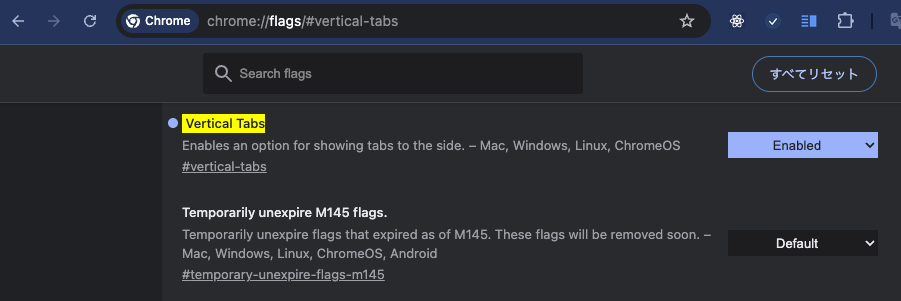
The “Vertical Tabs” entry will appear highlighted in yellow.

Chrome flags page showing the Vertical Tabs setting. The dropdown is set to Enabled.

As shown in the screenshot above, “Vertical Tabs” is highlighted and you can change the setting from the dropdown on the right.

Step 2: Change to “Enabled”

Click the dropdown next to “Vertical Tabs” and select “Enabled” (the default is “Default”).

The flag description reads:

Enables an option for showing tabs to the side. – Mac, Windows, Linux, ChromeOS

Step 3: Restart Chrome

After the change, a blue “Relaunch” button appears at the bottom of the page. Click it to restart Chrome and activate vertical tabs.

Using Vertical Tabs

After restarting, tabs will appear vertically in the left sidebar.

Toggling the Sidebar

  • Click the sidebar toggle icon at the top-left of the window to show or hide the sidebar
  • Alternatively, right-click on the tab bar and select “Show tabs in side panel”

Collapsing the Sidebar

When the sidebar is in the way, click the arrow button on the left edge to collapse it (icon-only view). Click again to expand.

Reverting to Normal Tabs

To disable vertical tabs, open chrome://flags/#vertical-tabs again, set the dropdown back to “Default”, and restart Chrome. This restores the standard horizontal tab bar.

Differences from Edge’s Vertical Tabs

Microsoft Edge’s vertical tabs are a polished standard feature with tab group nesting and auto-collapse support. Chrome’s vertical tabs are experimental, so there are some differences:

Feature Chrome Edge
Availability Experimental flag Standard feature
Tab Groups Basic support Nested display
Auto-collapse No Yes
Stability May change with updates Stable

That said, Chrome’s vertical tabs are perfectly usable for daily browsing.

Summary

Chrome’s vertical tabs can be enabled in under a minute via chrome://flags/#vertical-tabs. For anyone who keeps many tabs open or wants the same experience as Edge’s vertical tabs in Chrome, it is a feature worth trying.

Since it is an experimental flag, it may be disabled by a Chrome update. If that happens, simply follow the same steps to re-enable it.

Read more
Diary

GPT-5.5 Release: Current State and Future Outlook

2 Mins read

Introduction

In 2026, OpenAI released GPT-5.5, the successor to GPT-5.4. This article examines GPT-5.5’s features, how it compares to competing models, API migration considerations, and its implications for enterprise systems — particularly in Japan.

Positioning of GPT-5.5

GPT-5.5 is the latest evolution of OpenAI’s flagship model, building on GPT-5.4. It remains a general-purpose foundation model for language understanding and generation, covering text generation, summarization, translation, and code assistance.

Key improvements over GPT-5.4 include:

  • Enhanced reasoning accuracy
  • Stronger multimodal support (image and audio input integration)
  • Advanced agent capabilities (external tool invocation)
  • Expanded token limits

AI Usage Rates Across Major Countries

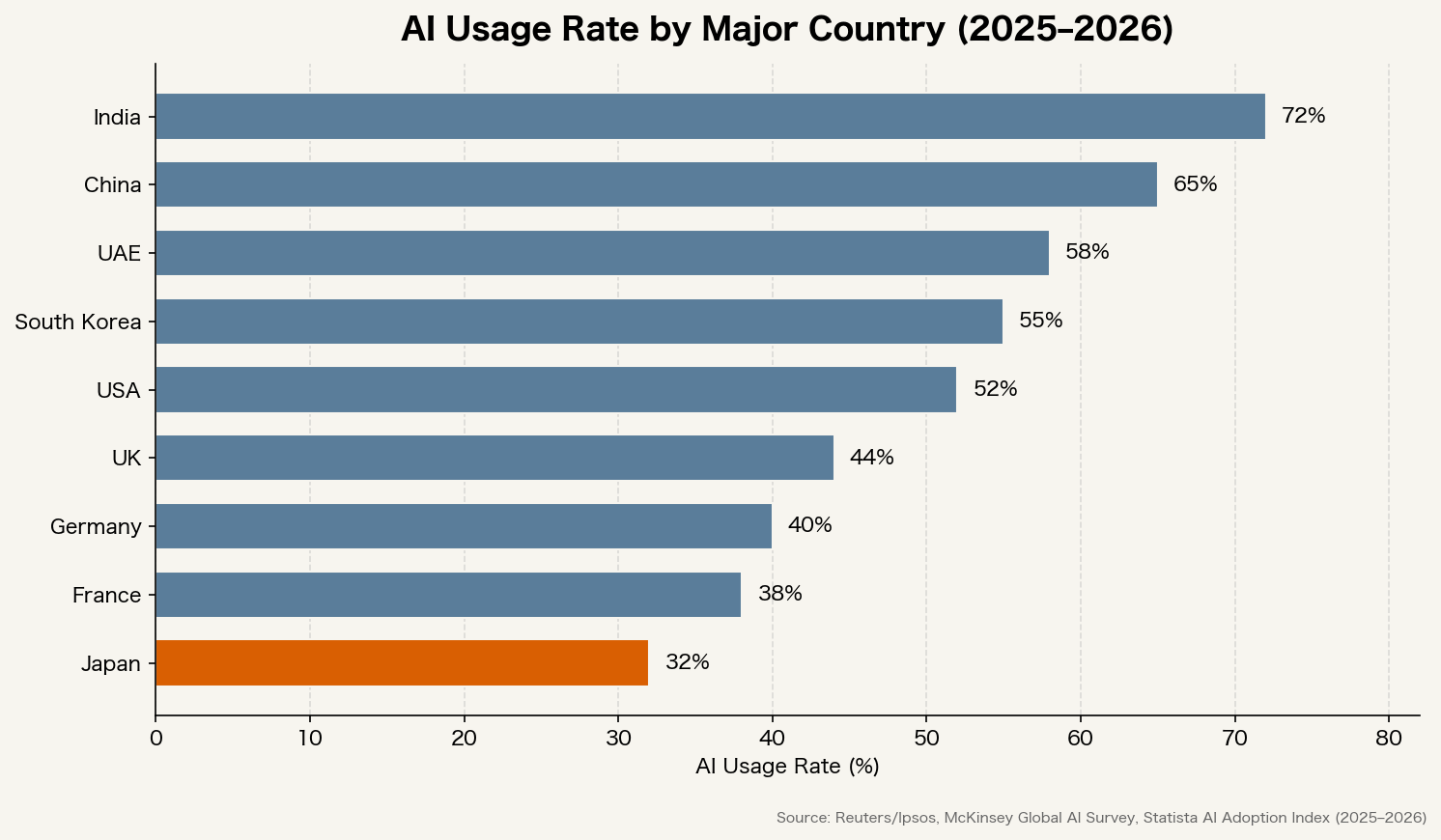
The adoption of AI models including GPT-5.5 varies significantly by country.

AI usage rate by major country (2025-2026). India 72 percent, China 65 percent at the top. Japan at 32 percent.

While India and China show high usage rates, Japan remains at 32% — one of the lowest among major economies. There is still significant room for Japanese enterprises to integrate AI into their operations.

Comparison with Competing Models

GPT-5.5’s main competitors are Anthropic’s Claude series and Google DeepMind’s Gemini series.

Anthropic positions Claude as “The AI for Problem Solvers,” focusing on problem-solving capabilities. Google DeepMind’s Gemini follows the concept of “Learn, build, and plan anything,” balancing general-purpose use with specialized domains (Veo for video generation, Imagen for image generation, AlphaFold for life sciences).

Feature GPT-5.5 (OpenAI) Claude Opus 4.6 / 4.7 (Anthropic) Gemini 3.1 Pro (Google)
Key Strength Ecosystem maturity, plugin integration Long-context processing, safety design Multimodal integration, Google services
API Availability OpenAI API, Azure OpenAI Anthropic API Vertex AI, Gemini API
Japanese Support High High High
Pricing Mid-High Mid-High (Opus 4.7 higher) Mid

Functional differentiation is narrowing. Selection criteria are shifting toward system compatibility, vendor lock-in tolerance, and alignment with internal security policies. The key question is not which model to choose, but how to fit it to your specific requirements.

API Migration Considerations

When migrating from GPT-5.4 or earlier to GPT-5.5, verify the following:

  1. Model name change: Update the model parameter to gpt-5.5
  2. Response format: New metadata fields may have been added
  3. Token limits: Maximum input/output token counts may have changed
  4. Deprecated parameters: Check for removed parameters

Migration checklist:

  • Verify existing prompts
  • Review error handling
  • Recheck rate limit settings
  • Recalculate cost estimates

Impact on Japanese Enterprise Systems

Integration with Forms and Workflows

Processing tied to Japan-specific business practices — such as invoice cut-off dates, approval circulation flows, and year-end tax adjustment documents — depends heavily on Japanese language precision in prompt design. With GPT-5.5’s improved Japanese capabilities, the effort spent manually correcting particles and phrasing may be reduced.

Azure OpenAI Availability Timing

For organizations that cannot send data outside Japan, such as financial and medical institutions, Azure OpenAI Service is the primary option. New model availability on Azure typically lags several weeks to months behind the OpenAI platform. Production deployment schedules should be planned only after confirming Azure availability dates.

Operational Considerations

Model version upgrades can subtly change output behavior. Japanese enterprise systems often implicitly expect identical outputs for identical inputs. Recommended countermeasures:

  • Automate regression testing
  • Periodically review output samples manually
  • Pin model versions for critical operations

Future Outlook

GPT-5.5’s release has further intensified competition in the LLM market. Google DeepMind is expanding the Gemini family with specialized models like Veo (video generation) and Lyria (music generation), and OpenAI is pursuing similar specialization.

In Japan, expansion of Azure OpenAI domestic regions, Japanese-specific fine-tuning options, and integration support services from domestic system integrators are expected to advance.

Summary

GPT-5.5 is a solid evolution from GPT-5.4, maintaining OpenAI’s flagship position in an increasingly competitive LLM market. When considering adoption, Japanese enterprises should make comprehensive evaluations that go beyond simple performance comparisons to include system integration feasibility, Azure OpenAI availability timing, and operational readiness.

Read more
Computers

Will ‘IPv8’ Ever Arrive? Expectations for Next-Generation Internet Protocols

8 Mins read

People sometimes say, “IPv4 was followed by IPv6, so maybe IPv8 is next.” In practice, though, there is no formal standard called IPv8. The version field in IPv4 is 4 bits wide, so values from 0 to 15 are theoretically possible. IPv5 was already used by the Internet Stream Protocol (ST) in 1979, and IPv6 was deliberately designed as a clean break from IPv4. There have been scattered proposals for IPv7 and beyond, but nothing after IPv6 has been standardized by the IETF.

So what is actually being researched and standardized as the next generation of Internet protocols? And how are those efforts trying to address the limits of IPv4? This article looks at the current state of play.

IPv4 Is Still Here, but the Pain Points Keep Growing

Start with the obvious fact: IANA ran out of unallocated IPv4 space back in 2011. In day-to-day operations, though, IPv4 is still kept alive by NAT, CGNAT, CDNs, proxies, and the address transfer market.

IPv6 adoption rates still vary widely from country to country.
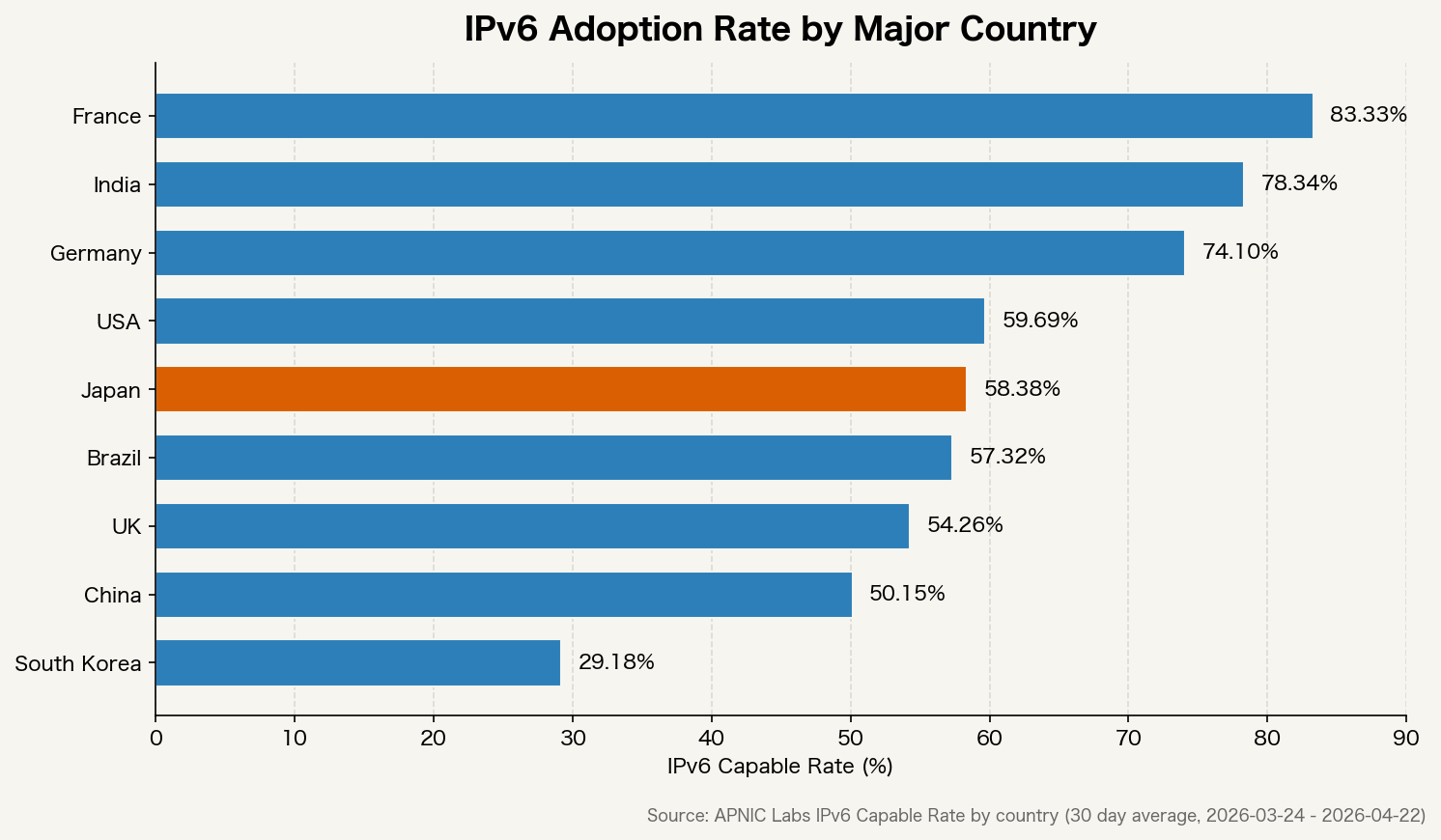
IPv6 adoption rates in major countries

France and India are already in roughly the 70 to 90 percent range, while Japan and South Korea are still below 50 percent. The reason IPv6 rollout remains slow is not that the standard itself is broken. The real issue is that NAT still works well enough to postpone migration, so the business priority often stays low.

Fixed broadband speeds also differ sharply across countries.
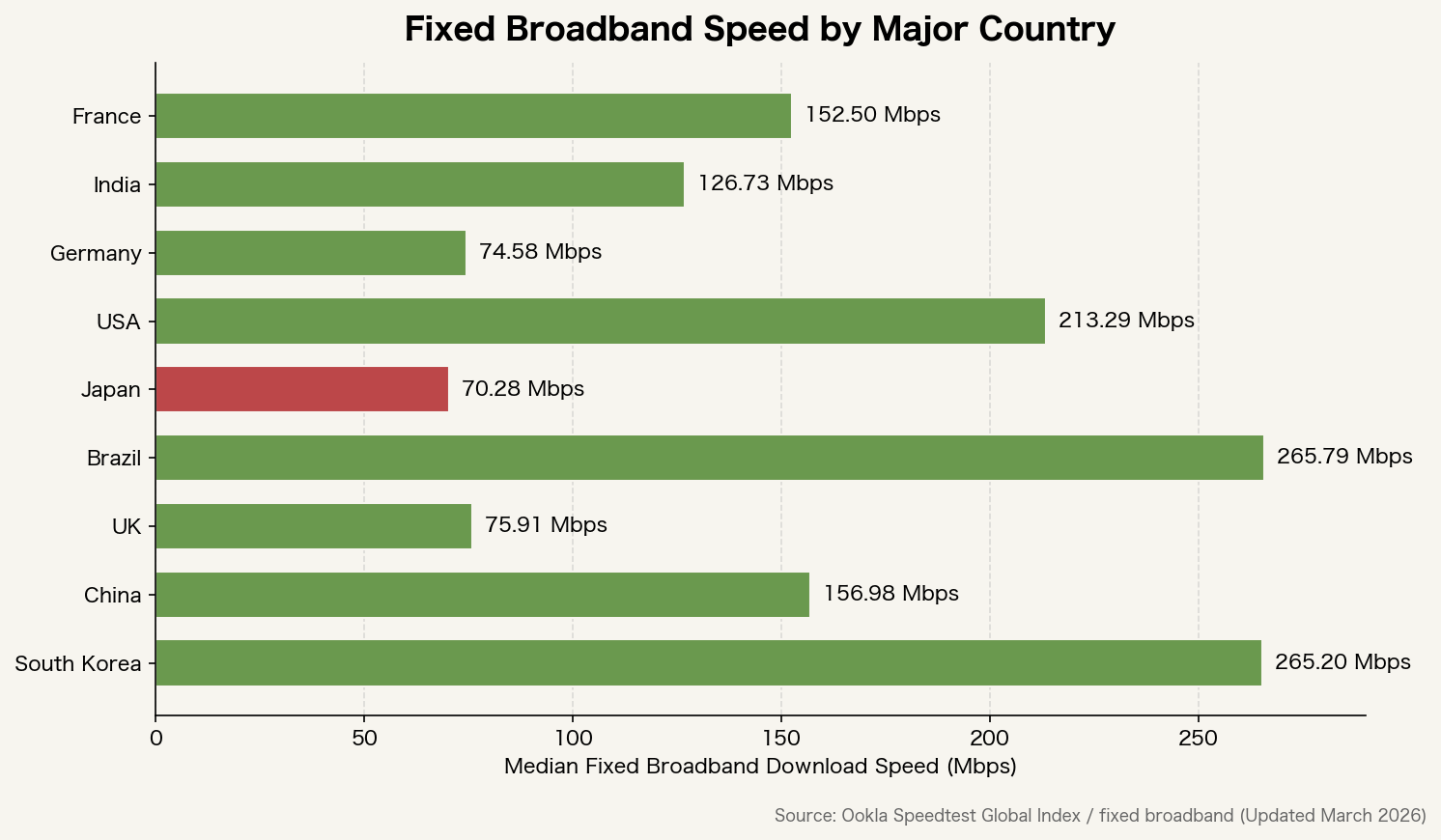
Fixed broadband speeds in major countries

Infrastructure investment is still the biggest factor, but extra NAT and proxy layers also add latency. The more patches are applied to stretch the life of IPv4, the more network paths lose their simplicity.

Why IPv6 Chose a Clean Break, and What That Cost

IPv6 gave up backward compatibility with IPv4 on purpose. The goal was not just to expand the address space from 32 bits to 128 bits, but also to redesign the header format and move back toward an end-to-end model that does not assume NAT.

That clean break, however, also made migration expensive. The long dual-stack era forced organizations to manage monitoring, firewalls, log analysis, and allowlists twice. Costs went up, but the end-user benefit remained hard to see, so many teams concluded there was no compelling reason to move immediately.

That experience naturally led to a different question: could the network be extended without throwing away compatibility with IPv4? That line of thinking is what led to SRv6 and a range of transition technologies.

SRv6: Extending IPv6 While Carrying IPv4

SRv6 (Segment Routing over IPv6) uses IPv6 extension headers to make packet paths explicit. It was standardized in RFC 8986.

What matters here is that IPv4 packets can be encapsulated inside SRv6. In other words, IPv4 traffic can be carried over an IPv6-based path-control model. It is one of the closest things we currently have to an IPv4-friendly upgrade path built on top of IPv6.

SRv6 is attractive because it can address several operational problems at once.

  • Path control without MPLS labels, which reduces label-stack complexity
  • Finer-grained traffic engineering on a per-path basis
  • More consistent path control across cloud and carrier network boundaries
  • A single forwarding plane for mixed IPv4 and IPv6 environments

NTT, China Telecom, and Alibaba are already moving toward commercial deployment, especially between large-scale data centers and in 5G core networks.

SCION: Redesigning the Path Itself

While SRv6 extends IPv6, SCION (Scalability, Control, and Isolation On Next-generation networks) aims at something more radical: redesigning the path model itself. The project was led by ETH Zurich and introduced in IEEE Security & Privacy 2011.

The core idea behind SCION is simple: route choice should belong to the sender. On the Internet today, paths are determined by BGP (Border Gateway Protocol), and the sender has little direct control over which route traffic takes. In SCION, the sender can explicitly choose the path.

That has several implications.

  • It makes route hijacking and arbitrary path manipulation harder
  • It lets the sender choose paths based on latency, bandwidth, or reliability
  • It helps contain failures within a narrower set of autonomous systems
  • Authentication is built into the architecture, making spoofing more difficult

SCION is already used in production by the Swiss Secure Finance Network (SSFN). Because it can run as an overlay on top of IPv4 and IPv6, it can coexist with today’s infrastructure.

NDN: Routing by Content Name Instead of IP Address

NDN (Named Data Networking) routes traffic by content name rather than host address. It has been studied as part of the Future Internet Architecture project supported by the NSF.

Today’s Internet is built around the question, “Which host am I sending to?” NDN changes that to, “What content do I want?” Content is named, and routing follows that name.

That could solve several things.

  • The network itself can cache identical content, enabling CDN-like behavior at the infrastructure layer
  • Content integrity becomes easier to verify because verification can be tied to the content name
  • Mobility becomes smoother because communication is no longer anchored to the sender’s IP address

The downside is weak compatibility with the installed IP base, so broad adoption remains uncertain. For now, the more realistic use cases are in IoT and edge computing.

QUIC/HTTP3: Hiding IP-Version Differences at a Higher Layer

There is also a more pragmatic direction: do not replace the network architecture at all, and instead absorb IPv4/IPv6 differences at a higher layer. QUIC (RFC 9000) is the clearest example.

QUIC runs over UDP and does not rely directly on the IP address and port pair as the connection identifier. Instead, it uses a connection ID. That allows the connection to survive even when the underlying IP address changes.

In practice, that means upper-layer behavior can remain consistent whether the transport is running over IPv4 or IPv6. HTTP/3 builds on QUIC, and support is now widespread across major browsers and servers.

How Close Are We to an “IPv4-Compatible Upgrade Path”?

The most practical approach today is probably the combination of SRv6 and transition technologies such as MAP-T.

MAP-T (Mapping of Address and Port using Translation, RFC 7599) carries IPv4 packets across an IPv6 network and restores them to IPv4 at the edge. Endpoints stay on IPv4 while the backbone migrates to IPv6.

In combination, that allows an architecture where:

  • End users continue using IPv4
  • The core network is built around IPv6
  • Path control is unified under SRv6

That is already workable in practice. A brand-new protocol version called “IPv8” is not strictly necessary to get most of the way there.

What Is Already Happening in the Real World

It is worth separating real deployments from speculation.

  • 5G SA (Standalone): IPv6 is already the design assumption for the core network under 3GPP standards
  • Commercial SRv6 rollouts: China Telecom, NTT, and SoftBank are introducing it into backbone networks
  • SCION in production: already running in Switzerland’s financial network (SSFN)
  • Apple App Store review: apps are required to work in IPv6-only environments
  • Cloudflare / Google: IPv6 traffic keeps rising, while edge architectures increasingly absorb the differences between IPv4 and IPv6

The next phase of Internet protocol evolution is not arriving as one clean replacement. It is emerging as a layer-by-layer shift.

The practical step right now is to reduce dependence on raw IP addresses wherever possible. Move away from fixed-IP allowlists when you can. Shift toward certificate- and identity-based authentication. Use DNS properly. Lean on CDNs and edge architectures. Those are the kinds of design choices that make a system more resilient no matter which protocol model wins out.

My View: It Might Have Been Better to Extend IPv4 to Eight Octets

My personal view is straightforward.

When you look at the fact that IPv6 chose a clean break and the transition is still incomplete nearly thirty years later, it is hard not to wonder whether the design trade-off was the right one.

The model I find most compelling is simple: keep IPv4-style notation, but extend it to eight octets.

255.255.255.255.255.255.255.255

In other words, take the current x.x.x.x (32-bit) format and extend it into x.x.x.x.x.x.x.x (64-bit).

What would that have changed?

The address space would have expanded dramatically

IPv4 gives us roughly 4.3 billion addresses. At 64 bits, that jumps to about 18.4 quintillion. Even in a world with tens of billions of IoT devices, the address pool would be vast enough that NAT-based extension would be far less necessary.

Backward compatibility with IPv4 would have been easier to preserve

If existing IPv4 addresses had simply been represented as 0.0.0.0.x.x.x.x, then current IPv4 packets could have worked as a subset of the new model. Routers could have treated any address with upper four octets of 0.0.0.0 as IPv4-compatible. That alone might have shortened the ugly dual-stack period considerably.

Human-readable notation could have been preserved

An IPv6 address such as 2001:0db8:85a3:0000:0000:8a2e:0370:7334 is awkward to work with during incident response, log review, and firewall rule maintenance. With an eight-octet format, anyone comfortable with IPv4 could still parse it quickly.

# Current IPv4
192.168.1.100

# Proposed 8-octet extension
0.0.0.0.192.168.1.100   (IPv4-compatible space)
10.48.0.0.192.168.1.100  (example of a new global address space)

It might also have offered operational security advantages over IPv6

The advantage here would not have been stronger cryptography or better authentication by default. The advantage would have been operational. If IPv4 compatibility had been preserved, existing firewall rules, IP allowlists, SIEM correlation logic, and address-based settings in WAF and VPN appliances could have been reused much more easily. It also might have reduced the length of time organizations had to maintain separate IPv4 and IPv6 rule sets side by side.

IPv6 addresses are longer and support multiple compression forms, which makes human review, audits, and troubleshooting more error-prone. An eight-octet model would have kept logs, allowlists, and incident triage much closer to the IPv4 operational experience. In environments like Japanese enterprise systems, where fixed-IP allowlisting is still common, that might have reduced operational security overhead compared with IPv6.

There are practical drawbacks, of course

This still would not have been a perfect design.

  • Even 64 bits may not be enough for a far-future world of massive IoT and AI-agent networks, which is one reason IPv6 chose 128 bits
  • Routers would still have needed changes in address-processing logic, which would have been a heavy ask for 1990s hardware
  • Expanding the address format alone does not solve authentication or cryptographic security

Even so, “keep the notation and just add more octets” still feels like a plausible real-world alternative when you weigh it against the migration cost that IPv6 has imposed over the last three decades.

The designers of IPv6 clearly understood that trade-off and still chose the clean break. Even so, the fact remains that a large share of the world still runs on IPv4 today.

My View: NAT Bottlenecks Are Also a Physical-Layer Problem

There is one more angle that deserves attention.

NAT becomes a bottleneck not only because translation itself costs CPU cycles. Today’s network equipment also converts incoming optical signals into electrical ones before processing them. That electrical domain introduces heat, interference, and signal degradation. NAT processing happens there as well, so its limits become increasingly visible at large session counts.

NTT’s IOWN (Innovative Optical and Wireless Network) initiative, together with the APN (All-Photonics Network) at its core, is trying to rethink that structure from the ground up.

The conventional model looks like this.

Optical fiber -> [electrical conversion] -> router (electrical processing) -> [optical conversion] -> optical fiber

APN is aiming for something closer to this.

Optical fiber -> router (processed optically) -> optical fiber

The idea is to create end-to-end optical wavelength paths and forward or control packets without converting them back into electricity. IOWN also looks beyond the network layer toward devices and semiconductors themselves. NTT has cited goals such as 1/100 power consumption, 125x transmission capacity, and 1/200 end-to-end latency relative to current architectures.

What changes if that becomes practical?

The processing cost of NAT could fall at the root

If electrical conversion disappears, so do much of the delay and heat that come with it. The session-scale limits faced by CGNAT could ease significantly. That suggests that what people often describe as “NAT is slow” is not just a protocol issue, but partly a physical-layer one.

IPv4 could survive even longer

Paradoxically, widespread APN could extend the life of the “NAT is still good enough” world. But by easing the processing bottleneck, it would also let operators handle more devices with fewer boxes. Power consumption would fall sharply, changing the economics of infrastructure operations.

The next real breakthrough may come from an entirely different direction

The debate over IPv4 versus IPv6, or eight octets versus 128 bits, is fundamentally about addressing and path control. IOWN/APN introduces a different axis altogether: physical transport speed, power efficiency, and latency.

Protocol design and physical infrastructure evolve on separate timelines. If APN creates a foundation that can handle any protocol at high speed and low latency, then whether the future belongs to IPv4, IPv6, or something else, the practical range of choices becomes wider.

NTT is targeting commercialization in the 2030s, so this remains in the research and proof-of-concept stage for now. Even so, the idea of processing optical signals without converting them back into electricity could reshape the physical foundation of the Internet. It is well worth watching alongside the protocol debate itself.

Read more
DiaryiOS

Japan Is an iOS-Majority Market — Why You Need Both iOS and Android

2 Mins read

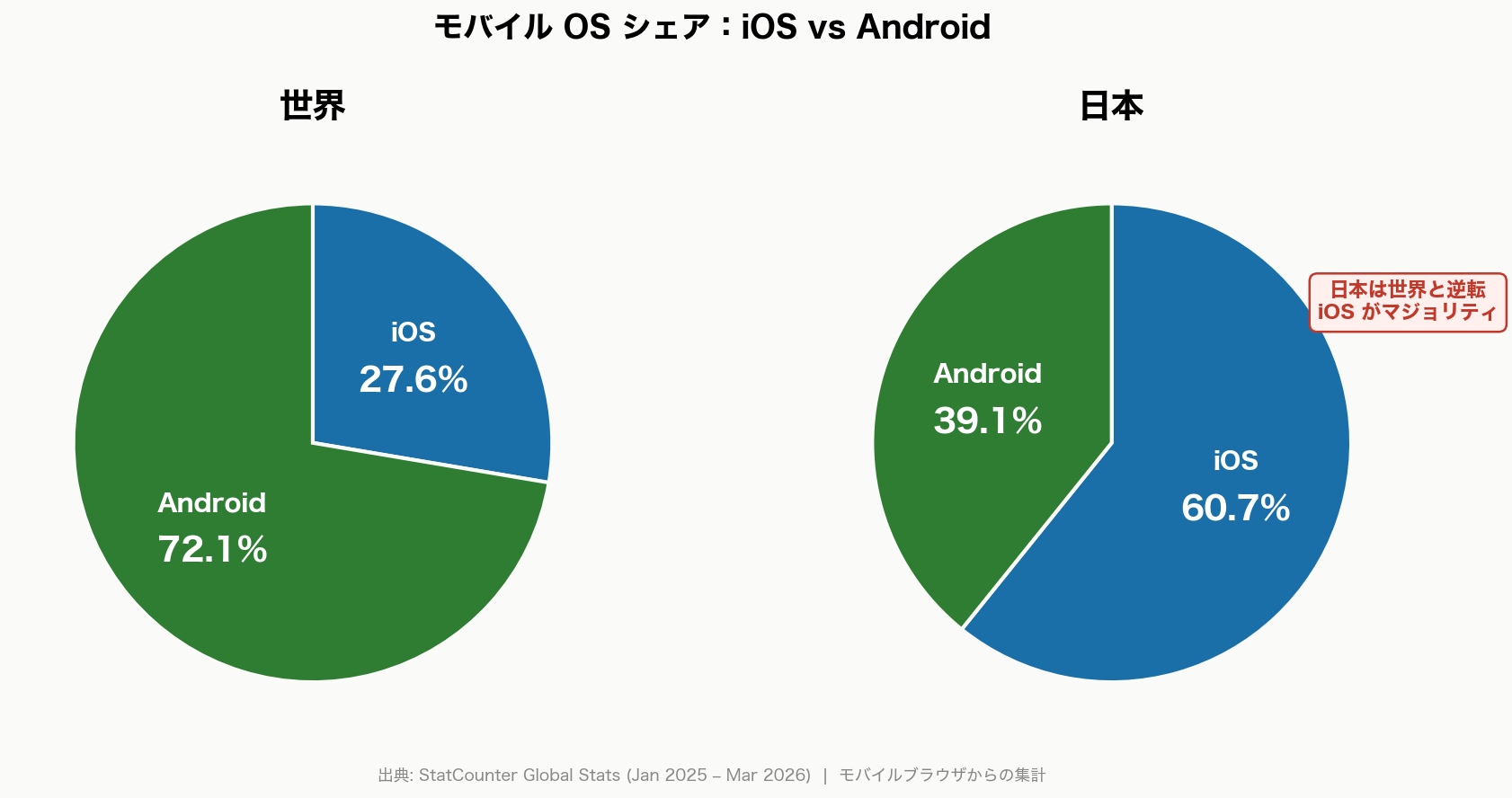
When you ship an app, do you default to “Android first” or “iOS only because corporate says so”? Globally that might fly, but in the Japanese market, that decision throws away 40–60 % of your potential users from day one.

Mobile OS share: iOS vs Android (Japan vs World, 2026)

As the chart above shows, the iOS/Android split in Japan and the rest of the world is completely reversed.

Japan vs. the World: The Share Flip

Worldwide, Android dominates mobile OS share. StatCounter data (Jan 2025 – Mar 2026) puts Android at 72.1 % and iOS at 27.6 % — roughly a 3 : 1 gap, driven mainly by affordable Android handsets across India, Southeast Asia, and Africa.

Japan, on the other hand, sits at iOS 60.7 %, Android 39.1 %. It’s one of the few iOS-majority markets on the planet.

Region iOS Android
World 27.6 % 72.1 %
Japan 60.7 % 39.1 %
US (ref.) ~56 % ~44 %
UK (ref.) ~52 % ~48 %

Source: StatCounter Global Stats (Jan 2025 – Mar 2026) / US & UK are estimates for the same period

Why Does Japan Lean So Heavily Toward iOS?

Factor Details
Carrier lineup NTT docomo, au, and SoftBank have featured the iPhone as their flagship device in stores for years
Youth adoption iPhone ownership skews highest among teens through 30-somethings, the same crowd driving LINE and TikTok
“No iPhone, no invite” culture iMessage and AirDrop are baked into school and workplace communication — not having them means being left out
Corporate devices Many companies issue iPhones for easier MDM management and stronger security ratings

These factors run deep and aren’t going to flip overnight. Expect this landscape to stick around for a while.

What You Lose by Supporting Only One OS

If you release a Japan-facing app on iOS only, you miss roughly 39 % of users on Android. Go Android-only and you miss about 61 % on iOS.

Supported OS Reachable Users in Japan Users Left Behind
iOS only 60.7 % 39.3 %
Android only 39.1 % 60.9 %
iOS + Android ~99.8 % Nearly zero

For enterprise apps, B2B tools, and internal systems, “some employees can’t access it” is a showstopper. Even for consumer apps, you end up splitting store reviews and word-of-mouth.

So What Do You Actually Do?

Go native — seriously

Flutter and React Native come up every time someone mentions cross-platform, but on any non-trivial project the cross-platform tax adds up fast: keeping pace with each OS’s latest APIs, chasing platform-specific bugs, and hiring engineers who can actually debug both layers. If you’re building a throwaway campaign app, sure, pick a framework. For everything else, native iOS + native Android remains the pragmatic default.

Run iOS 26 and Android 16 updates in parallel

2026 is a milestone year for both platforms.

  • iOS 26: Starting April 28, 2026, App Store Connect submissions require the Xcode 26 + iOS 26 SDK (⚠️ enforcement in progress)
  • Android 16: Google Play’s targetSdkVersion roadmap will require targetSdkVersion 36 sometime in 2026

A “finish iOS first, then Android” waterfall won’t cut it. Build a team process that tracks both platform updates in parallel — that’s the realistic play.

Details on each OS update are in separate posts:

Read more
Diary

Finish Your iOS 26 Migration Now — App Store SDK Requirements Change on April 28, 2026

4 Mins read

Uploading to App Store Connect will require builds with Xcode 26 and the iOS 26 SDK starting April 28, 2026. iOS 26 was released in September 2025 — a major update including the Liquid Glass design and Foundation Models framework announced at WWDC25. iOS 27 will be announced at WWDC26 (June 8–12, 2026) and is expected to ship in September 2026. This article lays out the migration order with both versions in mind.

App Store SDK Requirement Schedule

Every year, Apple raises the minimum SDK version required for submissions to App Store Connect.

Enforcement Date Required Xcode Required SDK Status
April 29, 2024 Xcode 15 iOS 17 SDK Enforced
April 24, 2025 Xcode 16 iOS 18 SDK Enforced
April 28, 2026 Xcode 26 iOS 26 SDK ⚠️ Action required
2027 (expected) Xcode 27 iOS 27 SDK Official announcement after WWDC26

Source: <https://developer.apple.com/news/upcoming-requirements/>

If you don’t build with the iOS 26 SDK, you won’t be able to upload app updates to App Store Connect. This isn’t about new features — it’s a mandatory requirement to continue delivering updates to existing users.

iOS 26 Migration Priority Order

Priority Action Item Reason
🔴 Critical Upgrade to Xcode 26 and verify the build Directly tied to the April 28, 2026 deadline
🔴 Critical Migrate to TLS 1.2+ if connecting to TLS 1.0/1.1 endpoints URLSession minimum TLS changed to 1.2
🟠 High Replace UIScreen.mainScreen usage Promoted to deprecated in iOS 26 SDK
🟠 High Verify Push to Talk app entitlements Legacy entitlement no longer supported in iOS 26 SDK
🟡 Medium Adapt to Liquid Glass design Standard UIKit/SwiftUI adapts automatically, but custom UI needs verification
🟡 Medium Check for CoreData Ubiquitous key usage Causes build errors with iOS 26 SDK

Get Your Tooling in Order First

Whether you’re working on iOS 26 compliance or early iOS 27 validation, the first blockers are usually build tooling issues rather than OS APIs. Lock down the tooling first.

Tool Recommended Version Notes
Xcode 26.4.1 or later Required for submissions after April 28
Swift 6.0 (Swift 5.x still supported) Swift 6 strict concurrency recommended
SwiftUI Version bundled with iOS 26 SDK New components for Liquid Glass support
iOS Deployment Target 16 or higher recommended iOS 15 and below are losing market share rapidly

The most common issue when migrating to Swift 6 mode is concurrency errors around CoreData. Accessing NSManagedObject outside @MainActor now triggers warnings, so the fix is to wrap operations inside context.perform blocks.

actor DataProcessor {
    func process(context: NSManagedObjectContext) async {
        await context.perform {
            // CoreData operations go inside context.perform
        }
    }
}

Behavior Changes in iOS 26 That Are Easy to Trip Over

TLS Minimum Version Change

For apps linked against the iOS 26 SDK, the minimum TLS version for URLSession and Network framework has been raised from 1.0 to 1.2.

If internal systems or external APIs still use legacy TLS settings, apps built with the iOS 26 SDK won’t be able to communicate with them.

// Example allowing legacy TLS (not recommended — temporary workaround only)
let config = URLSessionConfiguration.default
config.tlsMinimumSupportedProtocolVersion = .TLSv10 // triggers a warning
let session = URLSession(configuration: config)

The correct fix is to upgrade the server side to TLS 1.2 or higher. Make sure to check connections made through third-party SDKs as well.

Removal of UIScreen.mainScreen

UIScreen.mainScreen, which had been previously deprecated, has been promoted to deprecated in the iOS 26 SDK. For compatibility with multi-window and iPadOS scene support, screen size should now be obtained from UIWindowScene.

// Before (deprecated)
let screenWidth = UIScreen.main.bounds.width

// After (recommended)
if let scene = UIApplication.shared.connectedScenes
    .first(where: { $0.activationState == .foregroundActive }) as? UIWindowScene {
    let screenWidth = scene.screen.bounds.width
}

Push to Talk Entitlement Change

The com.apple.developer.pushkit.unrestricted-voip.ptt entitlement no longer works with the iOS 26 SDK. Migration to the Push to Talk framework (iOS 16+) is required.

CoreData iCloud Sync Key Removal

Keys like NSPersistentStoreUbiquitousContentNameKey, which were deprecated over 10 years ago for iCloud ubiquitous sync, now cause build errors with the iOS 26 SDK. Migration targets are NSPersistentCloudKitContainer (iOS 13+) or SwiftData (iOS 17+).

Adapting to Liquid Glass Design

Standard UIKit / SwiftUI components (navigation bars, tab bars, sheets, etc.) automatically adapt to the new design. For custom UI with manual drawing, it’s worth visually verifying on a real device how it interacts with background blur and glass effects.

Getting Ahead on iOS 27 (WWDC26: June 8–12, 2026)

WWDC26 runs June 8–12, 2026. As usual, the new OS will be announced on day one with Beta 1 released immediately. iOS 27 is expected to ship in September 2026.

Item to Verify Priority Timing
Complete iOS 26 SDK compliance before starting iOS 27 Beta testing 🔴 Critical By April 28, 2026
Evaluate Foundation Models framework (on-device LLM) adoption internally 🟡 Medium After WWDC26
Assess Declared Age Range API requirements (if you have youth-oriented content) 🟡 Medium After WWDC26
App Intents expansion (deeper Siri & Spotlight integration) 🟡 Medium After WWDC26
Re-verify Liquid Glass adaptation against iOS 27 design changes 🟡 Medium After WWDC26

Testing Priority for Simultaneous iOS 26 & 27 Support

Feature Area iOS 26 Verification Items iOS 27 Beta Verification Items
Networking Identify and fix all connections below TLS 1.2 Meet new security requirements for connected APIs
Layout & UI Visually verify custom views overlapping with Liquid Glass Apply new design guideline changes
Data Persistence Check for CoreData ubiquitous key usage Confirm SwiftData / CloudKit migration is complete
Push Notifications Verify APNs certificates & Push to Talk entitlements Check for notification UI rendering issues on iOS 27
Screen Size Verify layout changes from UIScreen.main replacement Confirm full iPadOS multi-window support
Third-Party SDKs Update to iOS 26–compatible versions Check each SDK for iOS 27 beta compatibility

Common Pitfalls for Japanese Business Apps

Risk Item Details Mitigation
Legacy encryption in corporate VPNs DES/3DES/SHA1-96/SHA1-160 are no longer supported for IKEv2 VPN. Apps using NetworkExtension-based VPNs need verification Update to AES-256/SHA-256 + DH group 14 or higher
TLS version on intranet connections Legacy internal web services such as attendance and expense systems may still be running TLS 1.0/1.1 Audit internal server TLS settings proactively
Japanese calendar and input behavior changes TextKit 2’s natural text direction handling has changed. Building with the iOS 26 SDK may alter Japanese text direction resolution logic Test vertical text and mixed Japanese text rendering on real devices
Apple Intelligence availability Foundation Models framework only runs on Apple Intelligence–capable devices. Some Japanese language features are rolling out gradually Verify fallback implementation for unsupported devices
Corporate MDM / device management Apps built with Xcode 26 need to be verified under MDM profiles Coordinate with IT to run TestFlight distribution in your corporate deployment environment early

What to Check Before Upgrading

The fastest first step is to do a rough scan for deprecated APIs.

grep -R "UIScreen.mainb|unrestricted-voip.ptt|UbiquitousContentName|UbiquitousContentURL" ./

Running a similar check for TLS-related issues helps catch things you might miss.

grep -R "TLSv10|TLSv11|tlsMinimumSupported|kCFStreamSSLLevel" ./
Read more