
Diary

Should You Adopt Java 26? Pros and Caveats Sorted for the Field

5 Mins read

Java 26 went GA on 2026/03/17.

There are a lot of preview features again, but there are some changes around HTTP/3, G1 GC, and virtual threads that could quietly make a real difference.

On the flip side, if your environment is still carrying legacy APIs or old JVM flags, there are clear spots where an upgrade could trip you up.

Especially coming from Java 8, the gap is large enough that it’s better to look at where you’ll get stuck before looking at what’s new in Java 26.

Overview Diagram
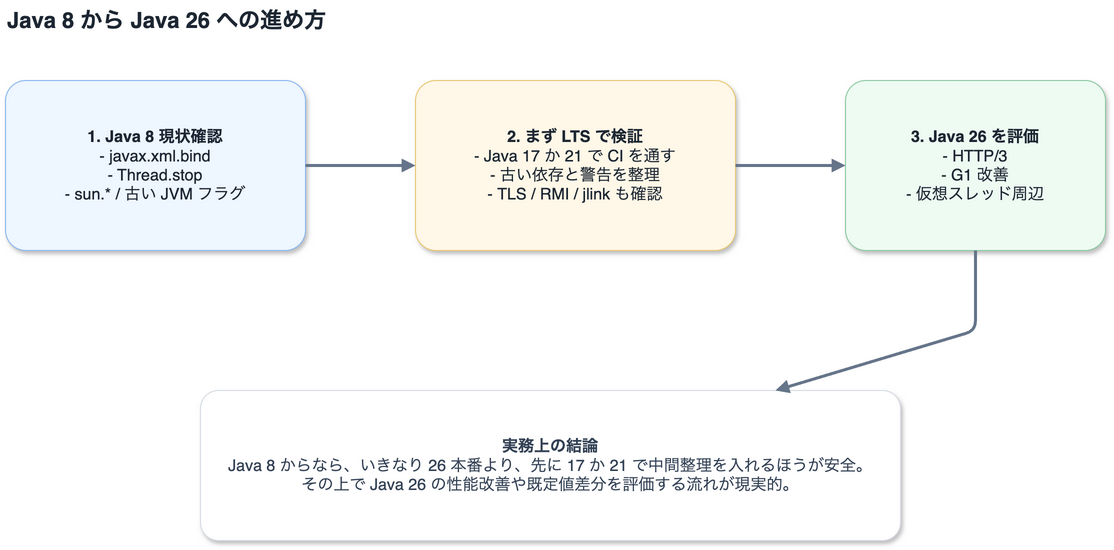
Migration flow from Java 8 to Java 26
Before going straight to Java 26 from Java 8, do an intermediate cleanup on an LTS version first

Java 8 in production
	|
	+-- Audit legacy APIs / libraries
	|      - javax.xml.bind
	|      - Thread.stop
	|      - sun.*
	|      - Old JVM flags
	|
	+-- Validate on an LTS first
	|      - Test on Java 17 or 21
	|
	+-- Then check Java 26 deltas
			 - HTTP/3
			 - G1 improvements
			 - Virtual thread changes
			 - Security default changes

What Looks Good

java.net.http.HttpClient now supports HTTP/3.

Being able to use HTTP/3 without major code changes on the app side is straightforwardly useful.

Beyond that, there are fairly solid performance improvements: reduced synchronization in G1 GC, better humongous object reclamation, and AOT Object Cache now supporting any GC.

Virtual threads have also been improved — they’re less likely to hold onto the carrier thread while waiting for class initialization, which should reduce weird blocking scenarios.

Some of the smaller but welcome additions:

  • Process now implements AutoCloseable
  • UUID.ofEpochMillis() was added, making UUIDv7-style handling easier
  • ByteOrder is now an enum, making it easier to use in switch statements

For example, the HTTP Client lets you benefit with minimal code changes:

var client = HttpClient.newBuilder()
	.version(HttpClient.Version.HTTP_3)
	.build();

var request = HttpRequest.newBuilder()
	.uri(URI.create("https://example.com/api/status"))
	.GET()
	.build();

var response = client.send(request, HttpResponse.BodyHandlers.ofString());
System.out.println(response.statusCode());

And since Process now implements AutoCloseable, cleanup after running external commands is a bit cleaner:

try (var process = new ProcessBuilder("java", "-version").start()) {
	var exitCode = process.waitFor();
	System.out.println("exit=" + exitCode);
}

Things to Watch Out For

First, Thread.stop() has been removed.

If it’s still lingering in legacy maintenance code, it won’t even compile on JDK 26.

The Applet API has also been removed, so environments pulling from old documentation or samples need to watch out.

JVM flag cleanup has also progressed — flags like -Xmaxjitcodesize, MaxRAM, and AggressiveHeap that you’ve been using out of inertia may need to be revisited.

RMI over TLS now enforces endpoint identification by default, so environments with sloppy certificate SANs may hit connection failures.

HttpRequest.Builder.timeout() now covers the full response body reception, not just the initial connection. Depending on your existing timeout design, this could cause noticeable behavioral differences.

For environments that have been running on Java 8 for a long time, here’s what to be aware of before jumping straight to Java 26:

  • Java 8 ran on the classpath model, but from Java 9 onward, module boundaries and internal API dependencies become visible
  • Java EE / CORBA modules were removed in Java 11, so if javax.xml.bind is still in your codebase, you’ll need a separate fix
  • Reflection and security defaults have become stricter — code that used to work silently may now warn or fail
  • Old TLS settings, keystores, and RMI connections are prone to breaking right after an upgrade

For Japanese business systems, character encoding is also a quiet minefield.

Banking and core business systems in particular often still assume Shift_JIS-family encodings for back-office and host system integrations.

If you naively consolidate everything to “UTF-8 is the standard now,” you can end up with insidious bugs where the UI works fine but reports or external integrations produce garbled text.

In the Java 8 era, there was a lot of code that happened to work because the default charset on Windows was windows-31j.

But since JDK 18, the default charset is UTF-8, so patterns like new String(bytes) or FileReader that rely on the implicit charset will behave differently after migration.

In practice, you also shouldn’t treat Shift_JIS and windows-31j as interchangeable.

Both are available in Java’s charset list, but windows-31j / MS932 includes Windows-specific extensions, so there can be mismatches with circled numbers, platform-dependent characters, and IBM/NEC extensions.

For banking file transfers and host connections, it’s safer to confirm upfront whether the other party expects “Shift_JIS but actually CP932,” “strictly within the Shift_JIS range,” or “IBM host code pages included.”

If you’re looking at Japanese language issues specifically, these should be part of your pre-migration checklist:

  • Is the charset explicitly specified in byte array conversions?
  • Are you conflating Shift_JIS and windows-31j?
  • Have you verified round-trip correctness for circled numbers, wave dash, fullwidth tilde, platform-dependent characters, and gaiji?
  • For report CSVs, fixed-length files, and host transmission: are you mixing up character-based and byte-based lengths?
  • Can you detect unmappable characters instead of silently replacing them?

So if you’re coming from Java 8, rather than going straight to 26 in production, it’s more realistic to first get your build and tests passing on LTS 17 or 21, strip out the old dependencies there, and then evaluate Java 26.

Java 26 itself is interesting, but absorbing the delta from Java 8 is where most of the real work lies in practice.

What to Check Before Upgrading

The fastest first step is to do a rough scan for deprecated APIs and flags.

grep -R "Thread\.stop\|Xmaxjitcodesize\|AggressiveHeap\|MaxRAM" ./

If you want to catch Java 8–era dependencies as well, run this too:

grep -R "javax\.xml\.bind\|javax\.activation\|CORBA\|sun\." ./

To do a rough scan for charset assumptions, this helps catch things you might miss:

grep -R "Shift_JIS\|MS932\|windows-31j\|Cp943\|Cp930\|EBCDIC\|file.encoding" ./

On the Java side, it’s safer to explicitly specify charsets and detect unmappable characters rather than relying on the default charset:

var charset = Charset.forName("windows-31j");
var encoder = charset.newEncoder()
	.onMalformedInput(CodingErrorAction.REPORT)
	.onUnmappableCharacter(CodingErrorAction.REPORT);

var bytes = encoder.encode(CharBuffer.wrap("顧客コード①"));
System.out.println(bytes.remaining());

Here’s a rough comparison:

  • Java 26 from Java 8’s perspective: Large gap — this is a migration project
  • Java 26 from Java 17’s perspective: Mainly evaluating new features and checking default value changes
  • Java 26 from Java 21’s perspective: Migration cost is relatively light

In more practical terms:

Perspective Java 8 Java 17 Java 21 Java 26
Position in the field Still common in legacy systems Solid first migration target Current primary candidate Early evaluation and tracking candidate
Migration difficulty Hardest starting point Good landing pad from Java 8 Easy to extend from 17 Relatively light from 21 onward
Key concerns Java EE removal, internal API dependencies Reflection and module boundaries Virtual thread adoption decisions HTTP/3, GC improvements, default value changes
Recommended approach Start with an audit Get CI passing first Easiest to standardize for production Validate deltas in test environments

For Java 8 projects, before getting excited about Java 26’s new features, the real topic is usually figuring out how to peel off Java 8–era technical debt.

Conversely, if you’re already on Java 17 or 21, Java 26 isn’t a “full migration” — it’s more about evaluating how to incorporate performance improvements and default value changes.

Here are some things worth verifying in CI for peace of mind:

  • HttpClient timeout and header behavior
  • RMI / TLS communication involving certificate validation
  • Runtime creation with jlink
  • XML Signature and legacy keystore dependencies
  • Round-trip tests for Shift_JIS / windows-31j / host integration files

Preview / incubator features are interesting, but they’re probably better viewed as evaluation targets rather than production-ready at this point.

Summary

Java 26 is less of a single blockbuster and more of a stack of solid improvements across performance, standard APIs, and operationally safer defaults.

For typical business systems, HTTP/3, GC, and virtual thread improvements are positive moves forward.

On the other hand, the more legacy code and legacy runtime flags your environment carries, the more important it is to audit first and upgrade second.

For Japanese environments, character encoding in particular shouldn’t be put off.

In shops where Shift_JIS-family encodings or host system integrations are still in play, fixing default charset dependencies and Japanese round-trip issues takes priority over evaluating Java 26’s new features.

Especially coming from Java 8, doing an intermediate cleanup on LTS 17 or 21 first and then going after Java 26’s benefits is the more sensible path.
Read more
Diary

Android 16 Migration and Android 17 Early Verification

4 Mins read

Bottom line: if you submit an update with a targetSdkVersion lower than what Google Play requires, it gets rejected at upload time. That means you can’t push updates to the store at all. This isn’t about new features — it’s a mandatory requirement to keep delivering updates to existing users and maintain your store listing.

Google Play has been raising the minimum targetSdkVersion by one level every August 31. Currently (August 2025 onward), all updates below API 35 (Android 15) are rejected.

Enforcement Period Requirement If Not Met
August 2023 onward API 33 (Android 13) or higher required Upload rejected
August 2024 onward API 34 (Android 14) or higher required Upload rejected
August 2025 onward API 35 (Android 15) or higher required Upload rejected
Around August 2026 (projected) API 36 (Android 16) or higher required Upload rejected

(Source: Google Play target API level requirements)

Based on this pattern, enforcement of API 36 (Android 16) is most likely around August 2026. To complete compliance before enforcement kicks in, this article scopes the work by working backward from an internal deadline of June 2026. Android 17 has reached platform stability at Beta 3, so running early verification in a parallel lane now means you won’t be scrambling when the final release drops.

Priority Order

Item Deadline Priority What to Do Now
targetSdkVersion 36 (Android 16) compliance By June 2026 Top priority Regression test key user flows, lock CI, finalize release plan
Android 17 Beta 3 verification Start now (ahead of schedule) High (separate lane) Compatibility testing on emulator and real devices, behavior changes audit
Android 17 new feature adoption After official release Lower PoC starting with low-impact areas

Get Your Tooling in Order First

Whether you’re working on Android 16 compliance or early Android 17 verification, the first blockers are usually build tooling issues rather than OS APIs. Lock down the tooling first.

Component Baseline Reason
Android Studio Panda 3 stable Stable foundation for targetSdkVersion 36 work
AGP 9.1.0 Easier to absorb R8 behavior differences and lint changes
JDK 17 Prerequisite for AGP 9.1
Kotlin 2.3.20 Align on a stable version baseline
plugins {
    id("com.android.application") version "9.1.0" apply false
    id("org.jetbrains.kotlin.android") version "2.3.20" apply false
}

Locking JDK 17 in CI, updating AGP, and absorbing R8 differences serves double duty — it lays the groundwork for Android 17 while getting Android 16 compliance through the door.

Note: Real-World Kotlin Version Distribution and Migration Cost

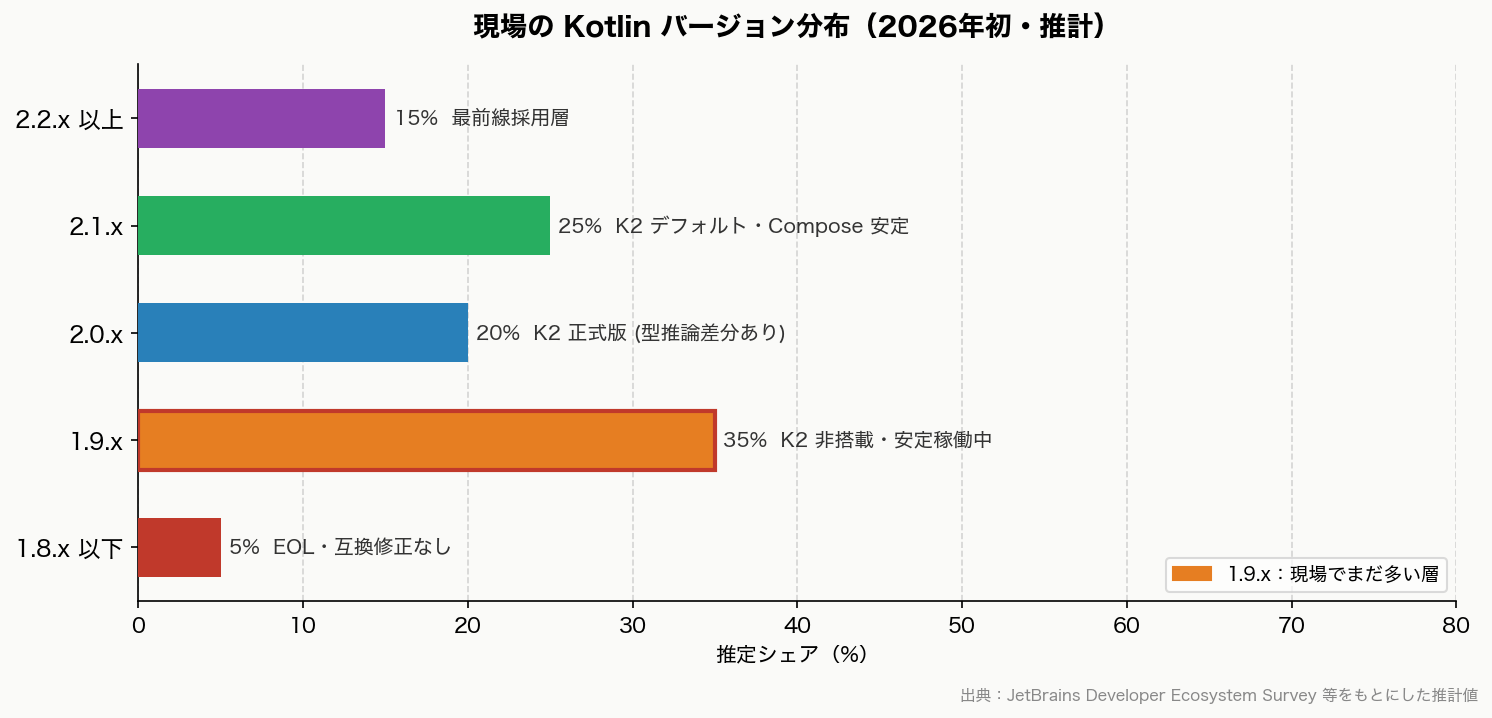
The “Kotlin 2.3.20” in the table above is the recommended baseline. In practice, many projects are still on the 1.9.x line. Finance, government, and large-scale projects in Japan tend to be particularly conservative — the “it’s stable, so don’t upgrade” mindset persists for a long time.

The chart below is an estimate as of early 2026 based on JetBrains’ public ecosystem data and community observations.

Kotlin version distribution in production (early 2026 estimate)

(Estimated values. For exact version-level share data, refer to the latest JetBrains Developer Ecosystem Survey)

When upgrading from 1.9.x to 2.x, it’s rarely just a Kotlin-only update — it usually means a bulk upgrade of Compose, Coroutines, and AGP together. Switching to the K2 compiler can change some type inference behavior, causing build errors. “We don’t need to upgrade our working 1.9.x app right now” is a perfectly pragmatic decision.

Current Kotlin Compose Compiler Approach Minimum AGP Key Considerations When Upgrading
1.9.x Legacy compose_compiler_extension_version 8.x Can stay as-is, but nearing EOL
2.0.x Compose Compiler Plugin (integrated into Kotlin plugin) 8.4 or higher Must switch to the plugin approach
2.1.x Same as above 8.7 or higher K2 enabled by default. Best Compose stability
2.3.x Same as above 9.0 or higher Cutting edge as of 2026. Requires AGP 9.1

Android 17 Behavior Changes to Get Ahead Of

Behavior changes have a bigger impact on existing apps than new features. Focus on changes that affect all apps first.

Change Apps Most Likely Affected What to Check First
usesCleartextTraffic deprecation trajectory All apps that currently allow HTTP Switch test and internal connections to network security config
Removal of implicit URI permission grants Apps with sharing, camera, or file attachment flows Rewrite to use explicit permission grants
IME visibility behavior change after rotation Every screen with input forms Regression test login, sign-up, and search flows
Stricter background audio restrictions Playback, calling, and audio notification apps Assess whether foreground service migration is needed

Testing Priority for Simultaneous Android 16 & 17 Support

When running Android 16 compliance and Android 17 early verification in parallel, it’s easy to lose track of what must be tested where. The table below defines required/priority items per test area — use it as a QA checkpoint to confirm when each area can be considered done.

Test Area Android 16 (Production) Android 17 (Early Verification)
Login / membership flows Required Required
WebView screens Required Required
Push / notification resume Required High priority
Background processing Required High priority
MDM / enterprise device restrictions High priority High priority
Android 16/17 new feature adoption (predictive text, new Compose APIs, etc.) Can defer If capacity allows

Risks Specific to Japanese Business Apps

These points are rarely covered in general Android migration articles from international sources, but finance, government, and membership-platform apps in Japan have their own specific gotchas. For projects where the priority is verifying that existing key flows — login, payments, notifications — aren’t broken rather than adopting new Android 16/17 features (notification channel changes, permission model overhauls, new Compose components, etc.), run through the items below as a checklist first.

Issue Why It’s a Blocker What to Check First
WebView Still heavily used in membership, sign-up, and payment flows Authentication, cookies, redirects, rendering issues
Certificates / corporate Wi-Fi Commonly breaks on corporate and managed devices Connection failures, certificate renewal, internal network behavior
MDM restrictions Major impact on enterprise-distributed apps Permissions, background processing, distribution controls
Push / background processing Directly affects membership, finance, and operational notifications Resume behavior, delays, post-restriction behavior verification
Device refresh timing Wide OS version variance across the user base Review supported OS range and QA device plan

Recommended Action Order

  1. Finalize the release plan with the assumption that the targetSdkVersion 36 (Android 16) update ships by June 2026
  2. Align your tooling: Android Studio, AGP, Kotlin, JDK
  3. Run key user flow tests and regression for Android 16 first
  4. In parallel, create a dedicated Android 17 branch and spin up a verification lane with emulators and real devices
  5. Work through behavior changes in order: security, media, connectivity
  6. Run a separate CI pipeline with targetSdk 37
Read more
Diary

Nginx reverse proxy WordPress mixed content error (HTTPS/HTTP)

1 Mins read

In an Nginx reverse proxy setup where the frontend Nginx accepts requests on 443 (HTTPS) and performs round-robin load balancing internally on 80 (HTTP), you may encounter a Mixed Content error in Chrome.

To fix this, add the following to the top of wp-config.php:

/** mixed content the page at ' url ' was loaded over https wordpress nginx */
/** When using proxy settings, you need to set it to redirect via https! */
/** Note: The HTTP_X_FORWARDED_FOR environment variable name may vary slightly depending on your server environment (AWS, etc.), so verify it */
if (!empty($_SERVER['HTTP_X_FORWARDED_FOR'])) {
    $_SERVER['HTTPS'] = 'on';
}

If you can modify the nginx.conf file on the internal 80 (HTTP) side, you can also use this approach:

Either option works fine.

location ~ \.php$ {
    include fastcgi_params;

    # mixed content the page at ' url ' was loaded over https wordpress nginx
    # When using proxy settings, you need to set it to redirect via https! From here
    fastcgi_param HTTPS on;
    fastcgi_param HTTP_X_FORWARDED_PROTO https;
    # To here

    fastcgi_intercept_errors on;
    fastcgi_pass php-fpm;
    fastcgi_param SCRIPT_FILENAME $document_root$fastcgi_script_name;
}
Read more
Diary

Rails 7.0.8.7 Update Startup Error "Logger::Severity.constants.each do |severity|"

1 Mins read

Ruby 3.2.6

Ruby on Rails 7.0.8.7

Fails on startup

The cause is the gem

gem 'concurrent-ruby', '1.3.5'

Add to the end of Gemfile and pin it for now

gem 'concurrent-ruby', '1.3.4'

After adding, install

bundle install

# Fetching concurrent-ruby 1.3.4 (was 1.3.5)
# Installing concurrent-ruby 1.3.4 (was 1.3.5)

Error log below

# With gem 'concurrent-ruby', '1.3.5' you get the error below, so pinning to '1.3.4'
#
# bundler: failed to load command: puma (/app-root/vendor/bundle/ruby/3.2.0/bin/puma)
# /app-root/vendor/bundle/ruby/3.2.0/gems/activesupport-7.0.8.7/lib/active_support/logger_thread_safe_level.rb:12:in `<module:LoggerThreadSafeLevel>': uninitialized constant ActiveSupport::LoggerThreadSafeLevel::Logger (NameError)
#
# Logger::Severity.constants.each do |severity|
# ^^^^^^^^^^
Read more
Diary

macOS 15 and later: Keychain Access icon removed from Utilities

1 Mins read

Tried to renew a certificate, but the Keychain Access icon is gone?

macOS Sequoia 15 and later changed how you launch it.

A “Passwords” app is now the main thing displayed, and Keychain Access—which engineers need—seems to have been hidden.

The underlying data is probably the same, but the Passwords app is a simplified interface for usability.

How to access it

Hit Command + Space to open Spotlight and type “key”—the icon will show up.

Apple’s official docs cover this too.

Read more